How to create a personal quiz from photos and stories
A photo from a trip or a story an old friend tells can become a quiz question. Ask about one detail, check the answer and save the rest of the story for the reveal. Use your own material or ask a few friends to help.
Use stories your friends know
Include clues in your photos
Write questions yourself or ask friends
Preview before the party
Give everyone a chance to answer
Try 12 questions to start: four easy observations, four shared memories and four photo or general questions. Include different parts of your friend’s life, with enough clues for people who have only recently met them.
Ask friends for photos and stories
Ask a few friends and relatives for photos and stories from different parts of their life.
Ask for one memory
Ask for a photo or a short story, along with who was there and what happened. Give people a deadline.
Write down who checked the answer
Keep the answer and the contributor’s name beside each question in your notes. If people remember an event differently, ask about a detail they agree on.
Keep the reveal short
Choose one detail for the question and save the rest of the story for after the answer.
A message you can send to contributors
“I’m putting together a short quiz for [name]’s [occasion]. By [date], could you send one photo or a short memory, plus one detail we can ask about and its correct answer?”
For a few contributions, a private message will do. With Events, you can collect replies through unison questionnaires and review them before choosing what goes into the quiz.
From a story to a question
“Jamie and I met on a delayed train. We started debating which biscuit was best, and we still disagree twenty years later.”
Ask where they met. An exact date or train number would be harder to check and harder for guests to guess.
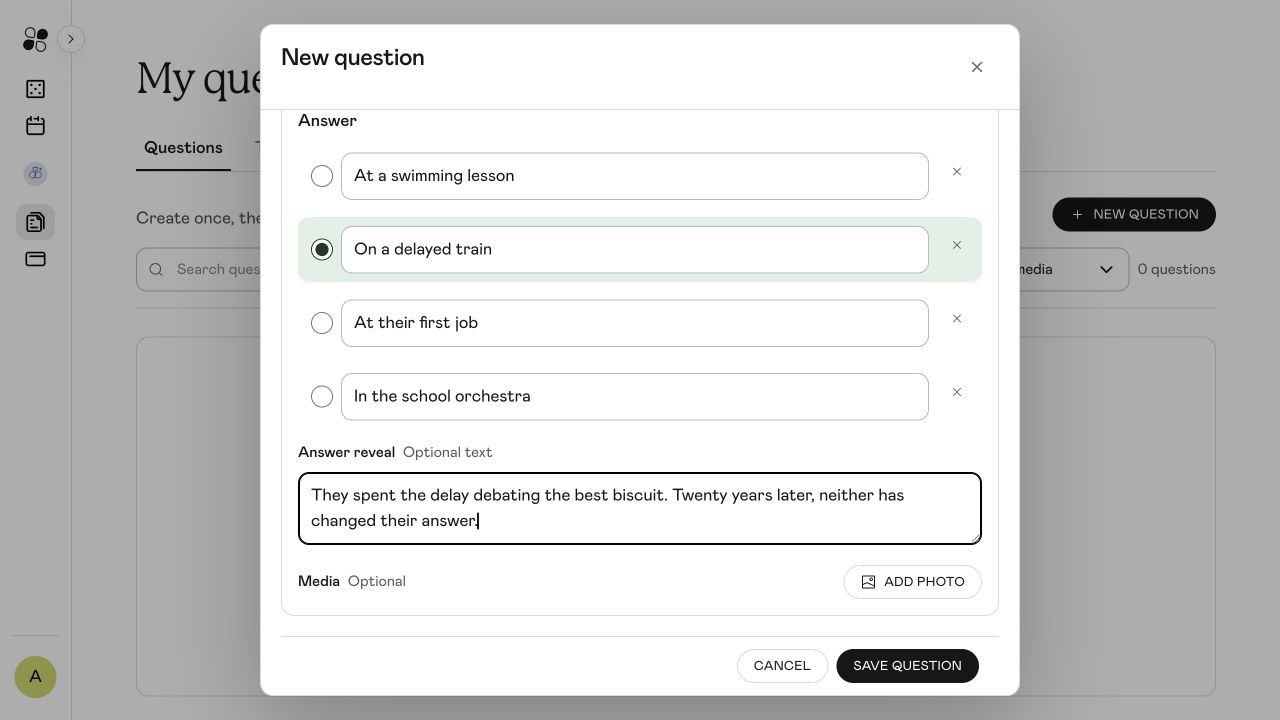
Use four plausible places as the options. Keep the biscuit argument for the reveal, when the friend who sent the story can tell it. Write down the correct answer before rearranging the choices.
Where did Jamie meet their oldest friend?
They spent the delay debating the best biscuit. Twenty years later, neither has changed their answer.
Write a question with a photo clue
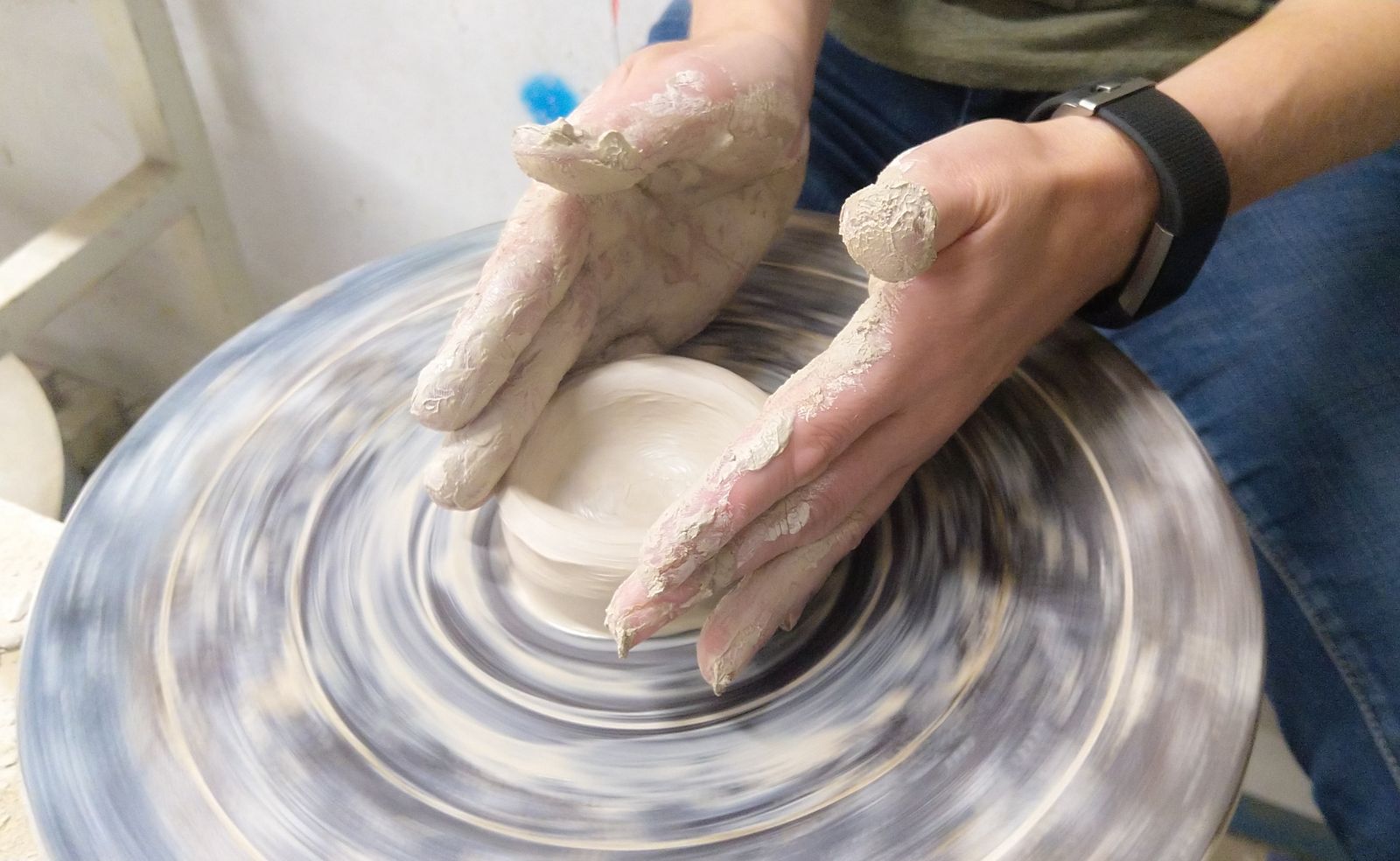
The clay and wheel in this photo give guests a clue, even if they do not know the person. With your own photo, ask about something they can see: a tool, an object or what someone is doing.
Keep the clue visible when you crop the photo. Check it on the screen you will use, and make sure the question itself does not give away the answer.
Which activity is shown in the photo?
Pottery: the hands are shaping wet clay on a spinning pottery wheel.
A 12-question running order
Set aside about 20 minutes to play, plus time beforehand to prepare. Run through the questions once to check the timing, especially if you want people to tell their stories.
Minutes 0 to 2: joining and a practice question
Explain where guests look and how they answer. Try one unscored practice question before starting the planned set.
Minutes 2 to 7: four easy questions
Use visible clues or confirmed favourites. Avoid a round that only one friendship group can answer.
Minutes 7 to 13: four shared memories
Include stories from different groups of friends and family. Write a sentence or two for each reveal, with time for people to respond.
Minutes 13 to 18: four photo or general questions
Use your photos alongside questions everyone can try. You can also add ready-made questions. Check the number and order once you have chosen them.
Minutes 18 to 20: results and one final story
Finish with a story you want everyone to hear. Allow extra time if people get talking, or use fewer questions. Keep predictions in an unscored round: nobody knows the answers yet.
Build your quiz in unison
Your own quiz questions require Games or Events. Use your own facts and photos; questionnaires are optional.
Create an event and choose the quiz
Use Create your personal quiz below to start event setup with the personal quiz selected. Choose the occasion and name the event.
Write each question
In My questions & Tasks, open Questions and choose New question. Choose an option creates a multiple-choice question. Add the question, enter the choices and mark the correct one. Add photo attaches question media; Answer reveal holds the short story after the answer.
Add saved questions to the quiz
Saving a question in your library does not automatically place it in an event’s quiz. Open the quiz setup and use My questions to select the ones you want. Check their order and the final question count.
Preview and rehearse
Read through the questions and answers, and check that photos display properly. Choose the playing format and test the guest link on another phone. You will need internet and a shared screen, plus speakers for audio rounds.
Mark the correct answer and write the reveal
Select the circle beside the correct option. Put the story in Answer reveal so it appears after guests have answered.
If you want friends to contribute through unison
Events includes guest questionnaires and content generated from guest responses.
Open Collect content in the event
Prepare a short questionnaire with a specific photo or memory prompt and a deadline for replies.
Share the contributor links privately
Send the links to your contributors before the party. Guests use a different link to join the live game.
Review before using responses
Check the answers and edit generated questions before adding them to the game.
Check the quiz before the party
Run through the quiz as a guest. Can you read each photo and understand what the question asks? Check the answer key before playing.
If you are still waiting for replies, use your own photos and facts you have checked. Add a few general questions to fill out the quiz.
Common questions
How do I make a birthday quiz about a friend using photos and stories?
Collect a few photos and memories, confirm one answer for each, then write a clear question with plausible options. Add a short reveal, mix in easier questions and rehearse the quiz before the party.
Can I make a personal quiz without asking guests to contribute?
Yes. Use your own photos and facts, or add ready-made questions. In unison, your own questions require Games or Events; guest questionnaires are optional and require Events.
How many questions should I start with?
Try 12 questions in three groups of four. Allow about 20 minutes, including joining and results. Rehearse once to check the timing, and leave longer if you expect people to tell stories.
Will saving a question add it to my event automatically?
No. Save it in your question library, then select it through My questions in the quiz setup. Check the quiz’s final question count and order before playing.
Can the quiz be a surprise?
Yes. Collect photos and stories from friends without inviting the birthday person to the questionnaire. Keep the questions and answer key with the host until the game.
Create your personal quiz
Write your own questions with Games, or use Events to collect stories from friends first.
Create your personal quiz