Turn your community meetup into an adventure
Give people something to discover together. Build a scavenger hunt with photo challenges, local clues and small tasks that start conversations. unison keeps the tasks, submissions and progress in one event.
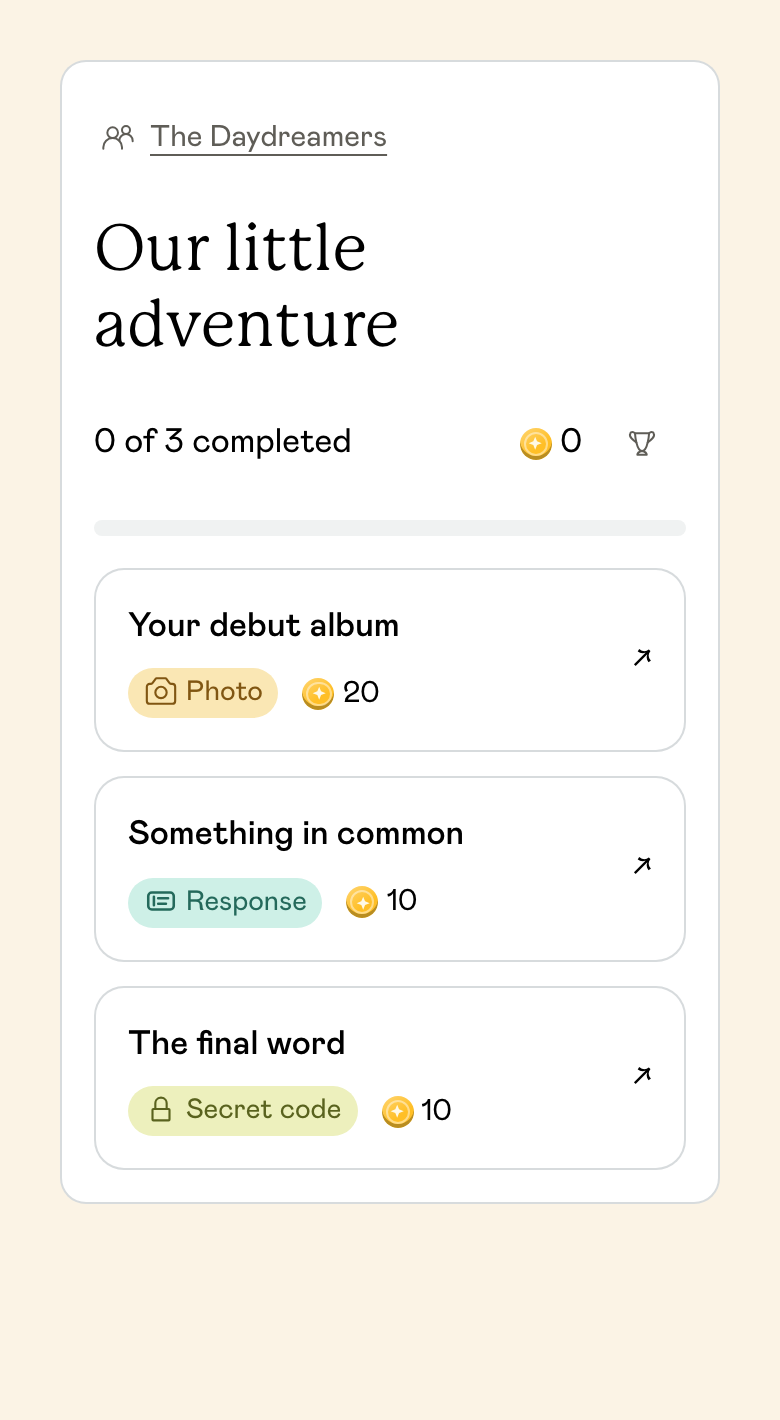

Choose a hunt for your community
A scavenger hunt gives people a list of things to find, do or capture. For a meetup, make some of those discoveries people: a new neighbour, someone with the same hobby or a member with a story to share.
A welcome hunt for new members
Mix newcomers and regulars in small teams. Add a conversation task, something to find in the venue and a group challenge. Start with unison’s Meet your guests quest template and edit it for your club.
A neighbourhood photo hunt
Choose a short area around your meeting place. Ask teams to spot a detail, photograph a local landmark and share something they noticed. Finish together so people hear what the other teams found.
An indoor social scavenger hunt
Use the people and objects already in the room. Find a shared interest, solve a clue on a noticeboard or build an imaginary album cover. This format also gives you a plan if the weather changes.
A shared community quest
Give teams separate sets of tasks leading to one common final challenge. unison’s cooperative quest mode can bring everyone to the same finish; you can also hide the leaderboard when the goal is taking part together.
A five-task scavenger hunt you can adapt
Suggested setup: 12–24 people in teams of 3–4, with 30 minutes to explore and 10 minutes to share the results.
Find a shared interest
Speak to someone outside your team and discover a hobby, book or place you both like. Submit what you have in common and one recommendation from the conversation.
We both grow herbs on a windowsill. Priya recommends starting with mint.
Spot the overlooked detail
Photograph a pattern, sign or piece of artwork within the agreed area. Ask teams to choose something they had never noticed before. Review the photos as host before accepting them.
Find a detail near the entrance that you could turn into the meetup’s unofficial logo.
Meet someone new
Introduce yourself to another participant and ask what brought them along. Use a Find a person task so the person you meet can confirm the interaction.
Meet someone attending for the first time and swap one thing you hope to try here.
Make your team’s album cover
Choose a team name and pose for an imaginary album cover. Use a corner of the venue or an agreed outdoor spot.
Your band has just released an album about this neighbourhood. What does the cover look like?
Leave an idea for next time
Ask each team to agree on one thing they would enjoy doing at the next meetup. Submit a short suggestion, then discuss the ideas when everyone returns.
A Sunday book swap, with a table for books we loved but never finished.
How to run your scavenger hunt in unison
Choose the place and finish time
Define where the hunt takes place, where people meet again and how long they have. Walk the route first. For a first meetup, keep the area compact and include tasks people can do at the meeting point.
Create your event and add a Quest
Select Community meetup, then Quest. Start from a template or write your own tasks. Choose individual or team play, and free exploration or a trail where clues lead to the next task.
Decide what counts as a completed task
Use photo or text submissions for open-ended challenges, a code or multiple-choice answer for a puzzle, or confirmation from another guest for an introduction. Set the points and which submissions you will review.
Share the link and play a practice task
Guests open the event link or scan the QR code in their phone browser. Explain the boundaries, finishing time and how to submit. Try one easy task together before teams head off.
Bring everyone back for the stories
Review pending submissions and show a few favourite photos. Ask each team for one discovery, then share the ideas for your next meetup.
Add a clue trail when the place has a story
For a community centre, campus or local history group, link tasks to things people can find at the venue. A plaque, a display or an agreed QR checkpoint can become the next stop.
Write a clue that makes sense on site and test the answer before the event. Give a hint if needed and avoid making specialist local knowledge a requirement for newcomers.
Example: the community noticeboard
Find the noticeboard near reception. Look for the poster with a watering can. Which day does the gardening group meet?
- Task type: multiple choice
- Options: Tuesday, Thursday or Saturday
- Before the event: place the poster and confirm the correct answer
- Next task: photograph a plant or green detail nearby
Make it easy for people to take part
Give newcomers a way in
Mix teams deliberately and begin with a task that anyone can answer. Ask about interests and ideas rather than how long someone has belonged to the group.
Offer different ways to contribute
Include talking, noticing, writing and photography. Keep an indoor or seated option available and explain the walking distance before people choose a team.
Test the phone connection
Live quest submissions need internet. Check coverage on the route and offer a paper version of the task list if you want an offline fallback; those answers will need manual review.
Keep the meetup going after the hunt
Find the Guest Bingo
Use a few squares about hobbies, skills or favourite local places while people arrive. It is a lighter option when you want mingling without a full task list.
A short group quiz
Pick a topic your members share, or build a round about the club and neighbourhood. Include questions newcomers can work out from clues, then let regulars add the stories.
The Scale
Gather around a shared screen and guess where a clue belongs between two extremes. It gives people another way to compare opinions after the teams have mixed.
One event for your community
Quests are included with Events, alongside Bingo, Secret Missions, Predictions, Awards, invitations, RSVPs and guest photos. Choose access for one event or a monthly subscription for recurring meetups.
Create the meetup, prepare your hunt and share one event link. Guests join in their browser without creating an account or installing an app. You can check submissions and progress from the host workspace.
Common questions
What is a community scavenger hunt?
It is a set of things to find, conversations to have or challenges to complete around a meetup or neighbourhood. Participants can play individually or in teams. In unison, build it as a Quest with photo, text, puzzle and find-a-person tasks.
Can we run it indoors without a walking route?
Yes. Use conversation prompts, objects in the room, a noticeboard clue and a creative photo task. Keep everything in one venue and offer tasks that can be completed from a seated position.
How many tasks should we start with?
For a first meetup, try five tasks and allow around 30 minutes, plus time to welcome people and share results. Test the route yourself and adjust for walking, conversations and the number of submissions you need to review.
Can teams work together instead of competing?
Yes. You can hide the leaderboard. Cooperative quests also let teams work on separate branches that lead to a shared final task. Choose the format before starting the quest and explain the common goal to everyone.
Do guests need an app, a TV or mobile data?
Guests join through a phone browser using your link or QR code. A quest does not need a shared TV, but opening tasks and submitting answers needs an internet connection through Wi-Fi or mobile data. A shared screen is useful if you add a hosted quiz or party game.
Give your next meetup a shared adventure
Start with five tasks, invite your community and see what they discover together.
Create a community quest